
Talking Electronic Liquid Level Indicator
$199.00
Part Number:
CP-Telli-01
Lead Time:
3-5 days
Shipping:
FREE SHIPPING on most orders over $50*
Quantity:
each
Style:
chemical
Description
Meet TELLI™ and ELLI™ (patent pending) the original Talking Electronic Liquid Level Indicators!
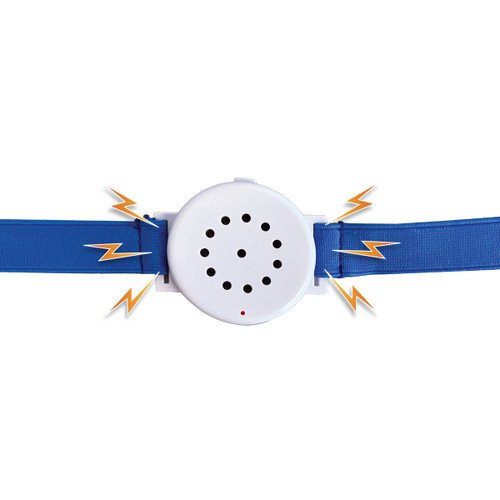
These non-contact devices allow you to easily keep track of the liquid level within a container without the risk of cross-contamination and chemical damage. Affixed to the outside of the container with an adjustable strap, TELLI and ELLI “talk” to the user, alerting everyone to dangerous liquid levels.
TELLI is a high-level alarm for overfill protection, alerting people when a container is almost full
Prevents overflows and hazardous chemical spills
Ideal for HPLC and LC-MS waste collection carboys
Great for waste collection drums
ELLI is a low-level alarm that prevent containers from running dry, alerting people when a container is nearly empty
Never run dry because you cannot see the liquid level in your container
Ideal for chemical feeds
Prevents supply interruption, prime loss, air lock, dry tank, chemical feed failure
TELLI and ELLI use radio waves to determine when a vessel is approaching a specific capacity. Powered by a long USB cable, they can use any USB power brick or computer port, meaning there are no batteries to fail or replace, eliminating the risk of power failure.
Features and Benefits
Easy to set up and maintain
Prevents overflows (TELLI) or dry-runs/feed starvation (ELLI)
UL tested for non-sparking
Works on most glass and plastic containers
Fits containers as small as 2 Liter and as large as 40 gallon (with standard strap) and containers as large as an IBC Tote with extension straps (not included.)
includes 8′ USB cable for constant power supply
Specifications
2″ diameter x 2.5″ across
1.7 cm thick
ABS plastic outer
Fits maximum container circumference: 54.5″ (17.35″ diameter / approximately 30-40 gallon)*
Fits minimum container circumference: 14.75″ (4.7″ diameter / approximately 2 Liter)
Elastic band stretches up to 27″ (relaxed) and 54.5″ (stretched)
How to use TELLI to prevent overflows
The Talking Liquid Level indicator (TELLI) is powered by a USB cable. Plug the cable into any compatible charging brick or powered computer port to power up the device.
To test TELLI before its first use, press the ON/OFF switch once. Place the TELLI against an empty section of your waste container and check the indicator light. If the device is successfully connected and no liquid is detected, the LED light will be green.
Next move the TELLI down toward the liquid in the container, maintaining contact with the container surface. The indicator light will turn red and flash when it detects liquid, and the voice alert will be activated. TELLI has successfully detected the liquid in your container. If TELLI does not successfully detect the liquid, press the ON/OFF switch 6 times to reset and try again. If the indicator light is not on, the device is not receiving power. Try plugging it into a different USB charger and try again once the light is on.
Once power is confirmed, try testing another section of the container. Certain opaque plastic containers may require testing in multiple locations before a consistently successful placement is located due to inconsistent walls interfering with the radio waves.
Once TELLI passes the liquid detection test, secure it against the tested area of the container with the adjustable elastic band. Choose a location near the top of the container, based on your fill rate (For example: during slow HPLC waste collection, TELLI can be placed high on the bottle. For faster processes, it’s better to place TELLI lower to allow the users more reaction time.)
When the liquid level reaches the TELLI’s location, a voice will alert the user to empty the vessel.
TELLI will stop its alarm when it no longer detects liquid. Slide it up above the liquid line or unplug it to shut off the alert. Replace it or power it back on once the container is empty again.
To reset: If you are experiencing inconsistent results, you can reset the TELLI by pressing the power button six times. This will recalibrate the device, after which it should behave normally.
How to use ELLI to prevent feed starvation
The Empty Liquid Level indicator (ELLI) is powered by a USB cable. Plug the cable into any compatible charging brick or powered computer port to power up the device.
To test the ELLI before its first use, press the ON/OFF switch once. Place the ELLI against a full area of your waste container and check the indicator light. If the device is successfully connected and liquid is detected, the LED light will be green.
Next move the ELLI upward toward the empty space in the container, maintaining contact with the container surface. The indicator light will turn red and flash when it no longer detects liquid, and the voice alert will be activated. ELLI has successfully detected that your liquid has “run dry” when it reads empty space in your container. If ELLI does not successfully detect the empty space, press the ON/OFF switch 6 times to reset and try again. If the indicator light is not on, the device is not receiving power. Try plugging it into a different USB charger and try again once the light is on.
Once power is confirmed, try testing another section of the container. Certain opaque plastic containers may require testing in multiple locations before a consistently successful placement is located due to inconsistent walls interfering with the radio waves.
Once ELLI passes the liquid detection test, secure it against the tested area of the container with the adjustable elastic band. Choose a location near the bottom of the container, based on your feed rate. For faster processes, place it higher to allow for more time to react.
When the liquid level reaches the ELLI’s location, a voice will alert the user to stop the feed or refill the vessel before it runs dry.
ELLI will stop its alarm when it no longer detects empty space. Slide it below the liquid line or unplug it to shut off the alert. Replace it or power it back on once the container is refilled.
To reset: If you are experiencing inconsistent results, you can reset the ELLI by pressing the power button six times. This will recalibrate the device, after which it should behave normally.
*Any size adjustable band can be used with TELLI. To use on larger containers, contact us for options and suggestions.

Reviews
There are no reviews yet.